To make a music visualizer, load a finished audio file, choose an audio-reactive style, add artwork and a title, then preview and export a video. You can start with one image and an MP3 or WAV. Check a short encoded sample before rendering the whole song, because the paused canvas does not show every peak in the animation.
This guide follows that workflow in VisualizerWave, using a simple release called First Light. Audio analysis and video rendering run on your device. Account and checkout services still use the network; local media processing does not mean the entire website works offline.
If you are choosing between local and hosted rendering, the Specterr comparison explains the workflow tradeoffs, current plan limits and what to test before a full release.
The finished example
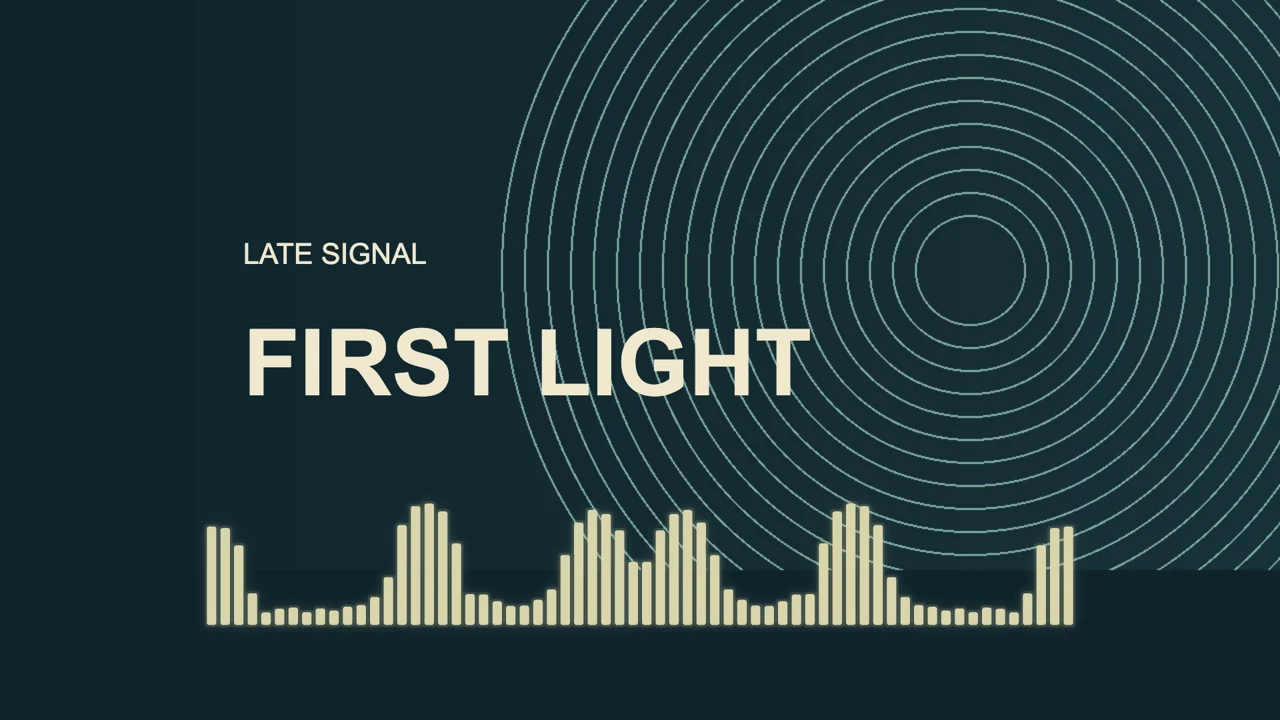
The animation combines one geometric background image, two text elements, and frequency bars. It shows a 1920 × 1080 composition at 30 frames per second, rendered with VisualizerWave's actual export pipeline. This page's animation has no audio track; your own music supplies the soundtrack when you create a release video.
The settings below are a starting point for this recording. Another master can drive the same bars much harder or more gently.
| Element | Setting used in this example |
|---|---|
| Canvas | Landscape, 16:9, 1080p |
| Starting template and style | Classic, with Bars |
| Bar color | Cream, matched to the title |
| Movement | 0.5 |
| Scale | 0.8 |
| Smoothing | 0.65 |
| Placement | Bars below the title; vertical offset 80 |
| Sound response | Standard, Full mix |
1. Prepare the audio and artwork
Use the exact mix you want people to hear. Check the first transient, any silence at the beginning, and the final reverb or delay tail before you create the video. Visual motion cannot repair a clipped master or a missing ending.
WAV or MP3? Use the original WAV master when you have it. MP3 is a practical smaller source when that is the available version. Converting an MP3 to WAV does not restore detail already lost in compression. The exported MP4 encodes a soundtrack; it is not a bit-for-bit copy of your source file.
The editor's upload panel lists MP3, WAV, and OGG. Other audio formats depend on what the browser can decode. If a file fails to open, export a standard WAV or MP3 from your audio software and try again. This worked example uses a WAV source, not a test of every format.
For the image, use the original release artwork rather than a small thumbnail. A landscape poster suits a full-frame background. If you have square cover art, a cover-focused template can preserve the square instead of cropping away its title or subject. See the cover art visualizer layouts.
Prepare the artist name and track title separately, unless they are already printed clearly on the image. Use audio and images you have permission to publish.
2. Load the song and choose the canvas
Open the editor and choose Media → Upload Audio File. Select your recording and wait for it to load. Use the Play control above the preview to check that it is the intended version.
Choose the shape before positioning the title:
| Intended composition | Canvas | Practical starting resolution |
|---|---|---|
| Landscape YouTube release | 16:9 | 1920 × 1080 |
| Vertical social clip | 9:16 | 1080 × 1920 |
| Square post | 1:1 | 1080 × 1080 |
These are layout choices, not guarantees that every device can export them. Use the compatibility test to check your browser's available export paths. A 720p test is useful on a device that struggles with a larger frame.
On macOS, the Mac visualizer guide explains browser capability checks, native listening tools and the difference between importing your recording and capturing system audio.
On Windows, the PC visualizer comparison explains the source checks for live listening and the browser checks for a finished video.
For a YouTube release, the YouTube visualizer page covers the landscape use case. Build a separate portrait composition for a short vertical version; changing the shape can crop the image or move elements into each other's space.
3. Choose a template, then add the image and text
In Templates, choose Classic for the bars used here. It is an explicit choice for this example; the current editor opens with Mirror Line by default.
In Media, use the Background controls to add your image. In the current editor, the action is Add image or video, or Change image or video when a file is already present. Make sure the media source is selected rather than a color background.
Edit the existing caption for your track title. Add another text element with + Text if you want the artist on a separate line. Keep the title visibly larger, then choose a visualizer color that belongs to the artwork.
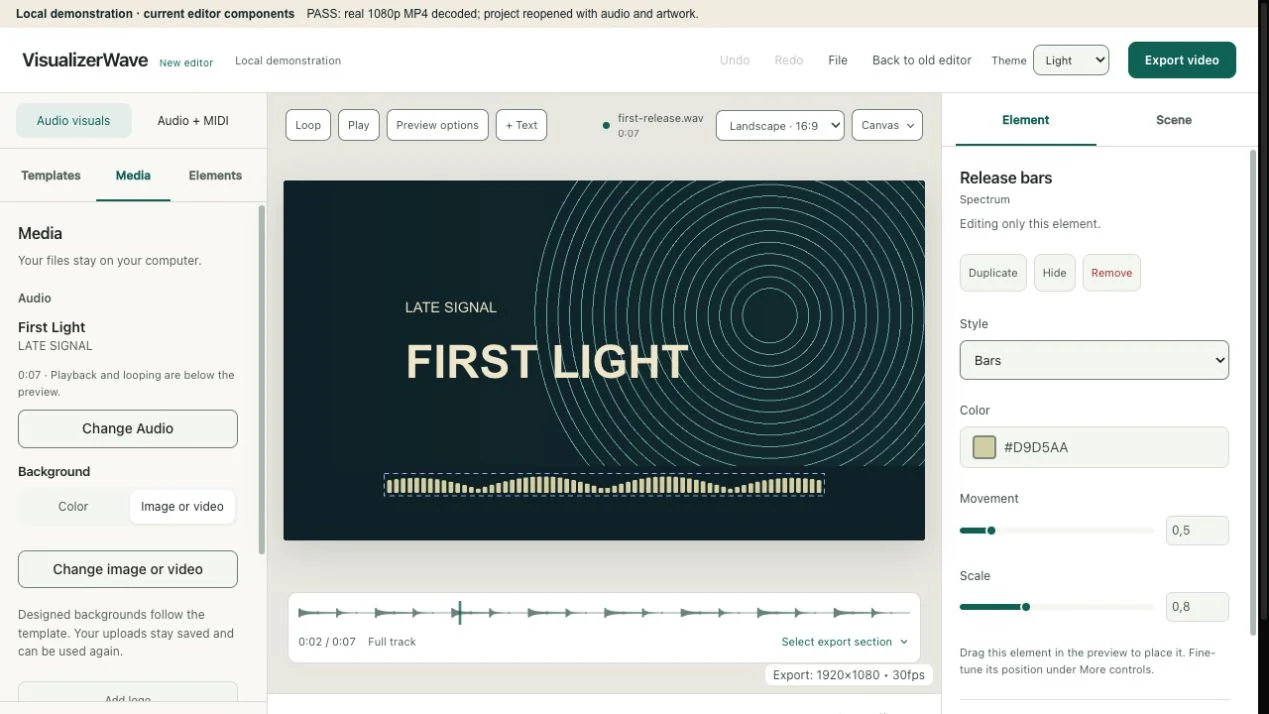
Current editor components displaying the original demonstration project in a local test view. The Media panel is on the left, the preview in the center, and the selected bars' controls on the right.
One image is enough: it provides the release identity while the bars supply motion. If a poster already includes your title, hide or edit the template's text rather than displaying the same words twice.
4. Adjust the sound bars around the title
Select the spectrum in the preview or Elements, then choose Bars in its Style control. Adjust Movement first. Use Scale for the overall size and drag the element to give it a clear area below or beside the artwork's main subject.
Open More controls for the additional settings, including Smoothing and fine position offsets. Increasing smoothing can soften abrupt changes; too much can make the motion feel sluggish. Available controls depend on the chosen style.
For First Light, Movement 1 allowed the encoded bars to reach the title. Reducing it to 0.5, with Scale 0.8, kept the peaks in their own lower area. That adjustment came from inspecting the exported frames, not only the paused preview.
Frequency bars respond to frequency content. They are different from a waveform tracing the audio signal. If you prefer a flowing line, compare the same source in the waveform, bars, radial, and stereo scope guide. The waveform animation tutorial demonstrates a quieter composition.
For a first release, leave scene effects restrained until the title, image, and main reaction work together. More glow or shake will not fix overlapping elements.
5. Preview quiet, strong, and ending passages
Play a quiet section, a strong section, and a transition. Seek to the ending as well. Check that the title remains readable, bars stay within the frame, and the soundtrack has the expected beginning and tail.
A busy song does not need every frequency to dominate the picture. Frequency-reactive styles offer music-response controls, but those controls change the visuals, not the sound of the uploaded mix. Use your audio software when the recording itself needs EQ or editing.
Preview looping helps you inspect a passage repeatedly. It does not extend the soundtrack or guarantee a seamless exported loop. The music loop guide explains those separate boundaries.
6. Export a short test, then the full video
Choose Export video. Check Video shape, Project resolution, Project frame rate, and Format. These fields also update the project, so return to the canvas if you change its shape.
For this example, use Landscape · 16:9, 1080p, 30 fps, MP4, and Saved project quality. Choose the method recommended for your browser and scene. Fast Render calculates frames locally; its speed depends on the device and the design. Realtime export records at playback speed and needs the tab kept visible.
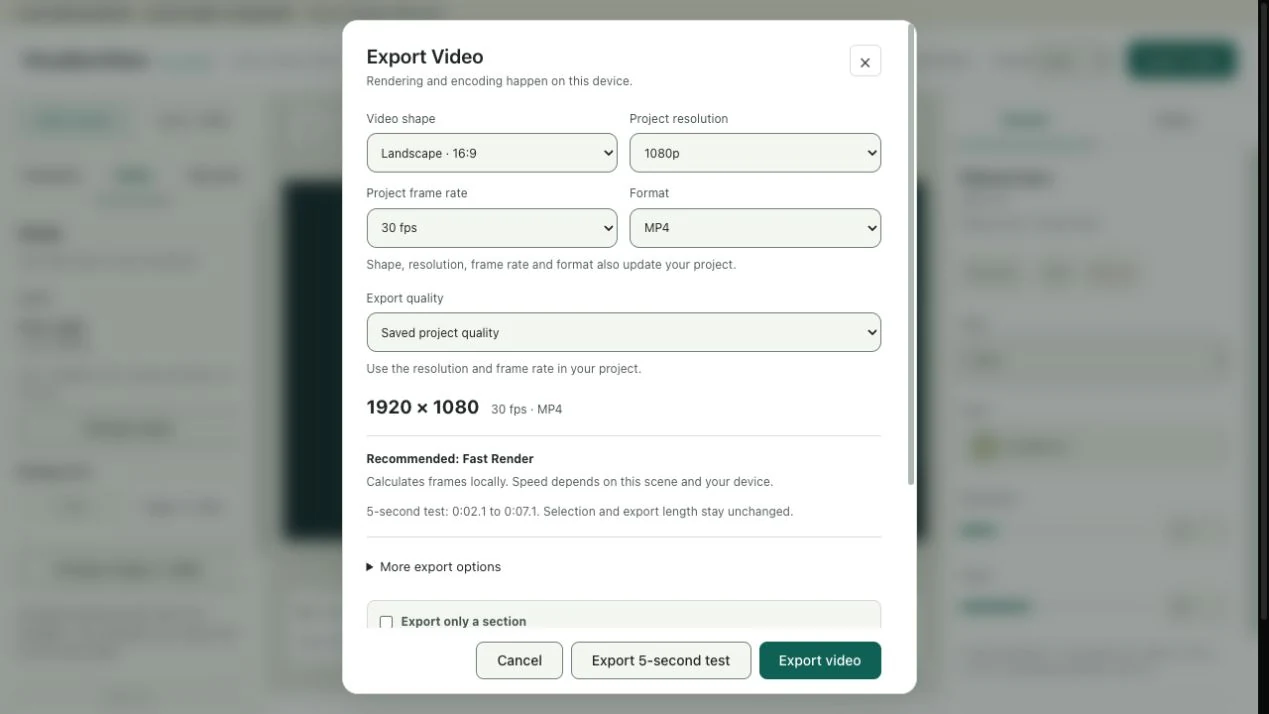
The actual export dialog in the local demonstration. Its recommendation and test range depend on the current project, browser, and playhead.
Click Export 5-second test first. The dialog shows which range it will use. This test leaves the selected full-export length unchanged; it is different from turning on Export only a section for a deliberate short social clip.
Open the saved test and check:
- The correct audio plays, with no unwanted gap or cut-off ending in the chosen range.
- Strong bar peaks leave the artist and title clear.
- The artwork crop, colors, and text look right at normal viewing size.
- The file opens in the player or editing app you plan to use next.
Then export the intended full track or section. Keep the browser and computer awake until the export finishes. MP4, WebM, 4K, and mobile export availability depend on the browser and device. For an extended mix, follow the DJ set workflow and its Long Set guidance.
YouTube's upload guidance lists MP4 and H.264 among its recommended settings. Keep the frame rate consistent with the video you created. A 4K option is useful when your artwork and device support it; increasing resolution does not restore detail to a small image.
Save the design for the next release
Use File → Save project file to keep a portable .visualizerwave backup with the available audio, artwork, and settings. The example project was packaged and reopened locally with both media files present. Browser recovery is convenient, but keep a project file outside the browser for a reusable design.
For the next single or EP track, open that project, change the audio and artwork, and update every text label. Preserve the type treatment and spacing if you want a consistent series. Recheck movement and duration: the previous song's response settings are not automatically right for the next master.
Common first-video questions
Can I turn an MP3 into a visualizer video?
Yes. Load the MP3 as the audio source, choose the visuals, and export a video with a soundtrack. The workflow is the same as the WAV example when the browser decodes the file. The MP3 alone does not provide artwork, lyrics, or note data.
How do I add sound bars without a watermark?
In VisualizerWave, use a Bars spectrum and export the video. The product's renderer does not add a VisualizerWave watermark; the worked MP4 shows the result. VisualizerWave is a paid tool: $19 once, with unlimited exports. Watermark-free does not mean free access.
Do I need MIDI or a video editor?
Audio-reactive bars work from the recording alone. Matching MIDI is optional when you want the actual notes to drive a design; see the MIDI visualizer guide. For a simple artwork-and-song video, this workflow does not require a separate timeline editor.
To keep an existing video edit and add the bars above it, follow the music bar overlay workflow. It explains black-background exports, Screen blending and avoiding a doubled soundtrack.
For a beat-store upload, use the type beat video guide. For a short melody or drum demonstration, use the sample visualizer guide. For spoken audio, the podcast visualizer walkthrough covers clear labels and pauses.
Explore VisualizerWave and make your first music visualizer.