Renderforest’s sound wave generator turns an uploaded recording into a template-based music visualizer video. Choose it when a particular animated scene fits your release and its template and export-plan limits cover the job. VisualizerWave suits creators who want editable release compositions, local media processing and unlimited exports for $19 once.
Before choosing, check three things together: the specific template, the export plan and the finished file. A plan advertising 4K or unlimited duration does not establish that every template supports your intended video.
Checked October 24, 2026. VisualizerWave publishes this comparison. We inspected Renderforest’s public pages, opened its Minimal Beats editor without uploading files, and reached a signup prompt at Export. We did not create an account or complete a Renderforest export. The silent VisualizerWave animation is an existing product export; the new check below exercises export-preflight rules with declared capability inputs.
The Animaker music visualizer comparison examines a scene-based workflow where scene length, audio length and title timing need separate checks.
What the Renderforest sound wave generator creates
Renderforest’s sound-wave and audio-waveform pages lead into its music visualization templates. The documented process is to choose a design, add audio, personalize text and artwork, preview, then export a video.
This is useful when you want an established scene: a neon environment, an album presentation or a restrained reactive design. Look at the motion and the editable fields in the actual template. A preview of one scene does not establish the controls available in another.
The phrase “sound wave” also needs context. A waveform traces signal amplitude over time; a spectrum separates frequency content into bands. Template names and decorative shapes do not always identify that distinction. If you specifically need a waveform rather than frequency bars, check the style’s behavior. Our waveform and spectrum guide shows the same recording in several styles.
Renderforest vs VisualizerWave: compare the release job
| Decision | Renderforest | VisualizerWave |
|---|---|---|
| Starting point | Choose a music visualization template and its available options | Choose a design, then edit artwork, text and reactive layers |
| Media workflow | Upload audio to the template editor; manage projects through an account | Analyze audio and render video on your device |
| Free output | Official help describes HD720 with a watermark | Paid editor access; $19 once |
| Paid delivery | Subscription tiers and a single HD1080 export option | Unlimited exports; format and resolution depend on browser/device support |
| Returning to the design | Account project editing and duplication are documented | Local recovery and portable .visualizerwave project files |
| First practical check | Template duration, aspect ratio and resolution eligibility | Compatibility, a representative saved sample and available resources |
VisualizerWave’s local media processing does not mean that the entire website works offline. Account and checkout services use the network. Check the export compatibility page in the browser you intend to use.
Check the template before paying for higher quality
The Minimal Beats Music Visualizer page displayed up to 30 minutes, with 16:9, 9:16 and 1:1 choices. We opened its editor and saw audio, font and watermark sections, a text field and a style selector. The audio panel offered upload sources; we did not supply a recording.
Clicking Export opened a signup prompt. This establishes the access step in our session, not the quality or speed of a completed Renderforest file.
The duration label matters because Renderforest’s general waveform page says there is no fixed audio-length limit, while its subscription comparison describes unlimited template duration. Those broad statements do not resolve the selected template’s 30-minute label. For a longer recording, ask which template and plan support it before committing to that design.
Likewise, the pricing FAQ qualifies 4K availability: the template must support 4K. Paying for the highest tier is not a reason to skip that check.
Free previews, single exports and subscriptions
Renderforest’s current help describes a free HD720 export with a watermark. It also explains how to purchase a single HD1080 export. Its pricing page displayed €19.99 for one HD1080 export, without a watermark.
The main plan cards showed these prices after we selected monthly billing:
| Renderforest plan | Monthly price displayed | Listed video-template quality |
|---|---|---|
| Lite | €14/month | HD720 |
| Pro | €34/month | HD1080 |
| Business | €49/month | 4K, on supporting templates |
These are EUR amounts observed in our browser, not universal checkout quotes. Annual billing showed different monthly equivalents and promotional pricing. Renderforest’s FAQ says annual subscriptions are paid upfront and subscriptions renew automatically. Verify the billing period, currency, renewal amount and applicable output conditions on the current offer.
The pricing page also has separate credit allowances for other creation tools. Read the video-template terms for this task rather than treating every credit figure as a music-visualizer export allowance.
For one delivery, compare the single-export offer with the subscription. For repeated releases, include the full video, alternate layouts and likely corrections in your decision. We did not verify how a revised project would be charged under a single-export purchase.
A worked check: a single, a teaser and a longer recording
Here are three concrete jobs to use when evaluating a design:
| Planned delivery | Renderforest check | VisualizerWave check |
|---|---|---|
| 3 minutes 40 seconds, landscape, 1080p | Within Minimal Beats’ advertised 30-minute duration; verify the paid HD1080 route | Check Fast MP4 support and inspect a short saved sample |
| 30-second portrait teaser | The template offers 9:16; inspect that version’s artwork and text placement | Reposition the composition for portrait and check peak motion |
| 31-minute recording | Exceeds the observed template label by one minute; confirm another eligible design | Long Set uses a different export path and requires direct-to-disk support |
This is a planning comparison, not three completed exports. The portrait version especially needs its own layout review: a landscape title and visualizer can collide or be cropped when the frame changes.
We also exercised VisualizerWave’s current export-preflight function with explicit capability inputs. A 1080p Fast MP4 job produced an error when WebCodecs support was set to unavailable. A 31-minute Long Set job produced an error when direct-to-disk support was unavailable. With the required declared capabilities present, those errors cleared.
That checks the application’s rules; it does not prove that a machine can encode those videos. Reliable Realtime for Long Set runs for the selected audio duration, plus preparation. Your browser, disk space, recording length and scene complexity still matter. Test the saved result before relying on a full-length render.
A reusable release composition in VisualizerWave
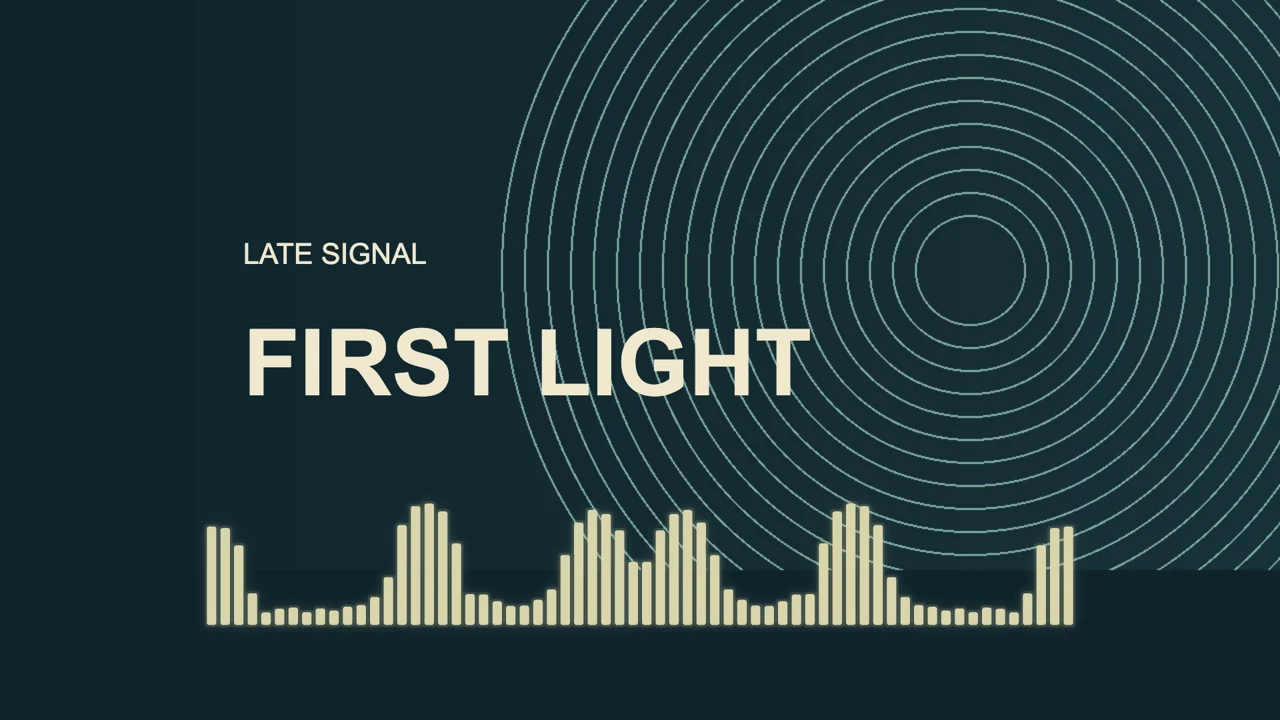
The First Light example combines geometric artwork, separate artist/title labels and frequency bars:
Reused, actual VisualizerWave output: eight seconds, 1920 × 1080, 30 fps. We rechecked the file and found no audio stream. This is not a Renderforest export or a matched comparison of rendering speed or image quality.
To build a similar release, import your final recording, choose the canvas, add your artwork and edit the text layers. Preview a quiet passage, the strongest passage and the ending. Keep the visualizer’s peak movement away from the labels, then export a short representative section and inspect the saved video.
Save a portable project alongside the final video so you can return to the editable design. When making another version, revisit the composition and export range. The complete music visualizer tutorial covers the current controls and the project-file workflow.
Which should you choose?
Evaluate Renderforest when one of its animated templates gives you the scene you want. Confirm its duration and aspect ratio first, then the export quality, watermark and purchase conditions.
Choose VisualizerWave when local media processing, reusable compositions and unlimited exports for $19 once fit your release workflow. Verify compatibility and a short saved sample on your machine.
For other browser services, the Specterr comparison covers its credit and duration rules, while the EchoWave comparison examines its editor plans and project reuse.
Create your next release visualizer with VisualizerWave.
Renderforest is a trademark of its respective owner. VisualizerWave is not affiliated with Renderforest.