VEED’s audio visualizer adds animated sound waves inside a broader video editor with timeline editing and subtitle tools. It is useful when the job includes footage, dialogue and captions alongside the visualizer. VisualizerWave fits reusable release compositions with local audio analysis and rendering, portable project files and unlimited exports for $19 once.
Two details can decide the choice: VEED’s sound wave follows the whole project’s audio, and a waveform does not communicate spoken words to a viewer watching on mute. Decide what should drive the motion and whether you also need timed captions before building the design.
Checked October 25, 2026. VisualizerWave publishes this comparison. We opened VEED’s editor, added a built-in sound-wave preset and its Happy Mood stock track, then reached an account requirement at Download. No local media was uploaded and no VEED video was downloaded. The silent example below is a new export through VisualizerWave’s actual renderer and exporter.
What the VEED audio visualizer does
VEED’s documented workflow is to add audio or video, open Elements, choose a sound-wave style, customize it, then export. Its editor combines that graphic with other timeline elements, including text and footage. The exported video is a separate deliverable from the editable project.
In our session, the interface appeared in German. We opened Elemente → Klangwellen and selected the preset labeled Trio Wave. Its controls included style, color, minimum and maximum dB, and start/end times. These are observations from that preset; they do not establish the controls or behavior of every style.
The timing controls matter. A sound-wave element needs to cover the intended section of the timeline. Adding an audio track does not prove that an existing visualizer element automatically extends to the complete recording. Preview the ending as well as the opening.
The sound wave responds to the whole project
VEED’s current help says a sound-wave element cannot be attached to just one selected audio file: it displays the sound wave for the full project. Adding another sound-wave element therefore does not create a separate visualization for each speaker or track.
That changes how you should plan these common jobs:
| Project | What to check |
|---|---|
| Finished music master plus cover art | Does the chosen style respond clearly without covering the artwork or title? |
| Dialogue over a music bed | Does the wave continue moving during speech pauses because the bed is still playing? |
| Two speakers on separate tracks | Do you need one mixed visualization, or separate speaker indicators requiring another workflow? |
| A short visualizer over a longer audio track | Do its start and end times cover the intended delivery? |
Adjusting the dB controls can change the displayed response. It does not establish that the tool has isolated the voice from the music. We did not test VEED’s response with separate speaker recordings or measure those controls as calibrated meters.
VisualizerWave’s Waveform Ribbon also uses the full mix. It does not identify the speaker or transcribe the recording. For detailed differences between a waveform trace and frequency bars, see the waveform and spectrum guide.
Waveform, headline and captions do different jobs
A waveform makes audio activity visible. A static headline explains the clip’s subject. Timed captions convey the words as they are spoken. One does not automatically supply the others.
VEED offers subtitle tools in the same editor. That can be useful for an interview excerpt or a spoken introduction where the final video needs dialogue text as well as a sound wave. Review the transcript, timing and placement against the final recording.
VisualizerWave provides editable text layers for labels such as an artist name, track title or episode headline. It does not automatically transcribe your audio or generate timed subtitles. If the delivery needs captions, include a separate captioning step or use an editor that handles them.
Our example: a written headline above a reactive waveform
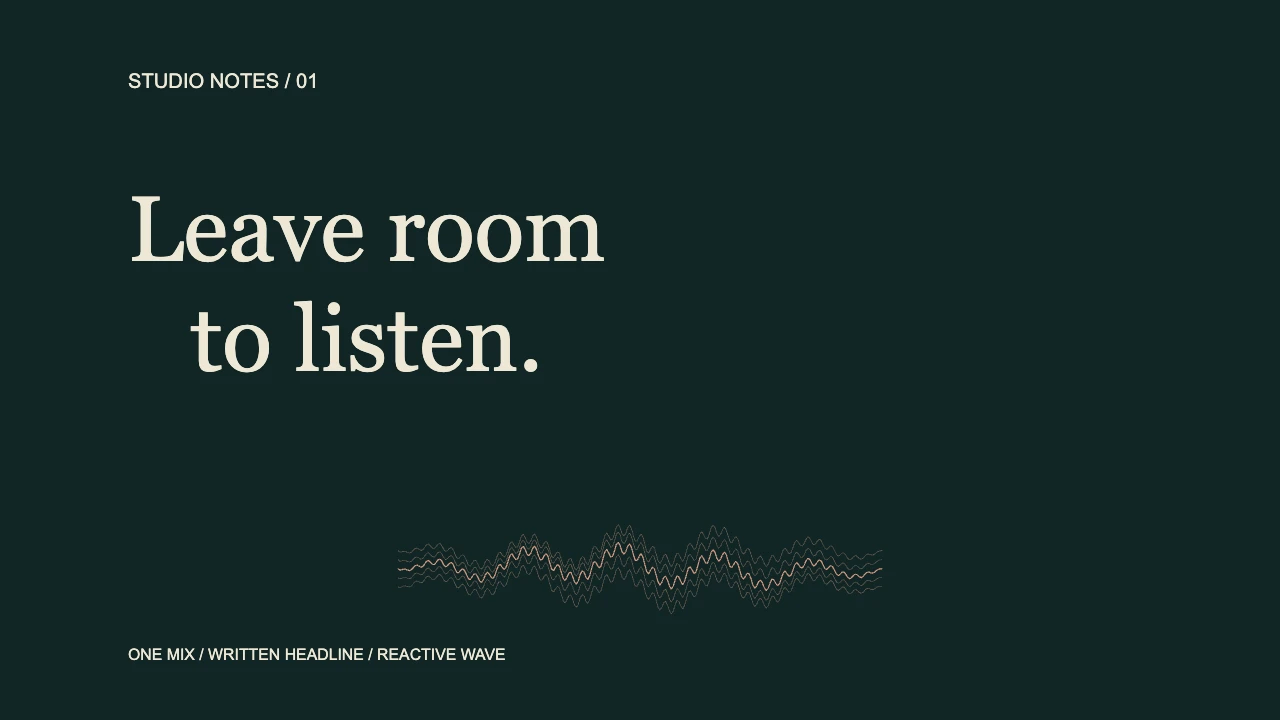
We made this composition with a dark green background, a cream headline and a small coral Waveform Ribbon. The words “Leave room to listen” were typed as text; they were not recognized from the audio.
Actual VisualizerWave output: eight seconds, 1280 × 720, 30 fps, with no audio stream. An existing internal teaching recording supplied the analysis. This is a product-code export fixture, not an editor screenshot, a speech recording or a matched VEED export test.
We compared the headline area in the source render at 3.1 seconds, during an active signal, and 6.8 seconds, during digital silence. The pixels in that area matched. The waveform became calmer during silence while retaining its decorative drift.
That is the practical distinction: the written message stays readable while the audio-driven graphic changes. Remaining movement in this ribbon is not proof that someone is speaking. A recording with room tone or background music may also keep driving the visual during a pause.
The podcast visualizer guide develops the speech-and-pause layout workflow. The creation tutorial covers importing a recording, editing the composition and checking a saved video.
VEED’s free export and caption limits use different units
The current pricing comparison lists 720p video exports up to 10 minutes on Free. Its export help confirms that free-plan videos carry a watermark. The same pricing comparison lists 10 minutes per month of automatic subtitles on Free.
Those are different allowances. For example, four three-minute clips are each shorter than the ten-minute video limit, but transcribing all four would require 12 minutes of subtitles. That is two minutes beyond the listed free monthly subtitle allowance, assuming none had already been used. This is a planning calculation, not four tested VEED exports.
The main plan cards displayed these paid options:
| VEED plan | Monthly billing, per user | Annual billing, monthly equivalent | Listed export quality |
|---|---|---|---|
| Creator | €22 | €11 | Up to 1080p |
| Pro | €47 | €23 | Up to 4K |
| Studio | €76 | €37 | Up to 4K |
These are EUR prices observed in our browser, with the relevant billing selection checked. An annual monthly equivalent is not a monthly payment. Check the currency, billing commitment, number of users, subtitle terms and current checkout total before purchasing. The paid Creator card lists watermark removal.
If you upgrade after making a watermarked video, VEED’s help says to export the original project again. Downloading an already watermarked file again does not remove its embedded watermark.
VisualizerWave costs $19 once, with unlimited exports and no VisualizerWave watermark. Export formats and higher resolutions still depend on your browser and device. Run the compatibility check and inspect a short saved sample before rendering the full track.
Local release project or broader hosted editor?
VEED documents server rendering for exported projects. Its timeline and subtitle workflow can suit a video involving several clips and a reviewed transcript. Check its current project, storage and delivery settings for the work you intend to keep.
VisualizerWave analyzes audio and renders video on your device. Account and checkout services still use the network. Save a portable .visualizerwave project alongside your finished video if you want to return to its source media and editable design.
Choose VEED when timeline editing, footage and subtitles are central to the delivery, and its current plan fits the required length, quality and watermark conditions.
Choose VisualizerWave when the main task is a reusable audio-reactive release video and you want local media processing with unlimited exports for one payment. Add a captioning step when the delivery requires one.
For another broader browser editor, the EchoWave comparison examines its current editor plans and project reuse.
Create your next release visualizer with VisualizerWave for $19 once.
VEED is a trademark of its respective owner. VisualizerWave is not affiliated with VEED.