G-Force music visualizer is SoundSpectrum's desktop software for graphics that react while music plays. Choose it when the main goal is an animated listening display. If you need your own track, artwork and titles delivered as a music-video file, evaluate the complete recording or export workflow before choosing a tool.
VisualizerWave serves that second task: import a recording, compose the visual and export a file. It is worth considering as a G-Force alternative for release videos. It does not replace G-Force's music-player integration or live audio-input workflow.
Disclosure: VisualizerWave publishes this comparison. We reviewed SoundSpectrum's current product pages and documentation on October 20, 2026; we did not install G-Force or record its output. The VisualizerWave animation below is an actual export reused from our 3D tutorial. This is a workflow comparison, not a measured performance contest.
Start with the output you need
| Question | G-Force | VisualizerWave |
|---|---|---|
| Main job | Real-time music visualization on a desktop | Compose and export a release video |
| Audio workflow | Supported player integration; Platinum adds Standalone audio input | Import your audio recording into the editor |
| Live visuals while listening | A central use case | Not the workflow compared here |
| Finished video evidence | Recording/export path not tested in this review | Completed short MP4 export shown below |
| Displayed price checked | Gold $20; Platinum $30, for personal use | $19 once |
For a listening display, the useful test is whether the visualizer receives audio from your actual player or input. For a release, the useful test is whether the downloaded file has the right framing, timing and soundtrack. A fullscreen preview and a finished video answer different questions.
The audio visualizer export comparison covers other file-creation options, including a free spectrum tool. This page focuses on the decisions specific to G-Force.
What G-Force does well as a listening visualizer
SoundSpectrum describes G-Force as real-time visualization software with changing effects and configurable behavior. Its documentation covers supported music-player hosts, fullscreen display, a toolbar and snapshots. The Platinum edition adds a standalone application that can react to an audio input without running inside a supported player.
That distinction matters if your music comes from another application. SoundSpectrum's Standalone documentation describes system-audio routing that depends on the operating system and available devices. Application audio on macOS may require a separate routing utility. A streaming app appearing in a third-party review does not, by itself, establish a current native integration.
Test the input you intend to use. A player plugin, an audio-routing device and an imported WAV are different ways to supply music to a visualizer. VisualizerWave's imported-file workflow is useful for preparing a release; it is not a reason to replace a listening setup that already works for you.
Check the current version before following an old guide
Some G-Force download pages describe much older software. During this review, Uptodown offered version 3.6.0, dated January 12, 2007. SoundSpectrum's official history listed 5.9.7, dated September 5, 2026, including VLC support on macOS and Windows.
Those dates change how you should read a tutorial. Instructions for an old player or installer are not a compatibility test for today's release. G-Force is still receiving updates according to its official history; an old mirror is not evidence that development stopped.
SoundSpectrum's current FAQ lists Windows 10 or later and macOS 10.13 or later, with Intel and Apple Silicon support. These are vendor requirements, not systems we tested. Check the current trial with your own operating system and supported player before buying.
Can G-Force export a music video?
We have not verified a current G-Force video-export workflow. The reviewed documentation establishes real-time visualization and snapshots; it does not establish a completed MP4 export in this comparison. A snapshot is a still image, so it does not answer the recording question.
There is also historical recording software to distinguish from the current product. SoundSpectrum announced Darkroom, formerly called G-Force Video Exporter, in January 2004, describing it then as Mac-only. That announcement confirms an older exporter existed. It does not verify that it works with current G-Force, current operating systems or your required video format.
Before choosing G-Force specifically for a release file, establish a current, supported recording path and make a short sample. Check its dimensions, frame rate, audio timing and whether it introduces capture controls or unwanted desktop elements. If screen recording is part of the method, evaluate that complete method rather than assuming the visualizer preview is the deliverable.
We would not describe G-Force as unable to export video on the evidence reviewed. We would also not promise a current built-in MP4 exporter without completing that workflow.
Pricing: personal use and public release are different decisions
SoundSpectrum displayed Gold at $20 and Platinum at $30 when checked. Its FAQ says these are not required subscriptions: the installed version can continue on a compatible system. A year of updates and download access is included; access to later releases can be renewed.
Those prices do not establish the cost of using G-Force visuals in a public release. SoundSpectrum's licensing page restricts its standard editions to noncommercial personal use and requires written permission for public or commercial use. It separately describes commercial licensing for uses including video recordings and public performance.
If the output is going on your artist channel or into a commercial project, confirm the applicable visual-output permission with SoundSpectrum. Do not treat the personal-use purchase price as a commercial-video quote. This licensing distinction can matter more than the difference between two small software prices.
VisualizerWave's paid offer is $19 once, with unlimited exports. That describes the product offer; you still need permission to use the music, artwork and other material you bring into a project.
A finished-file example from VisualizerWave
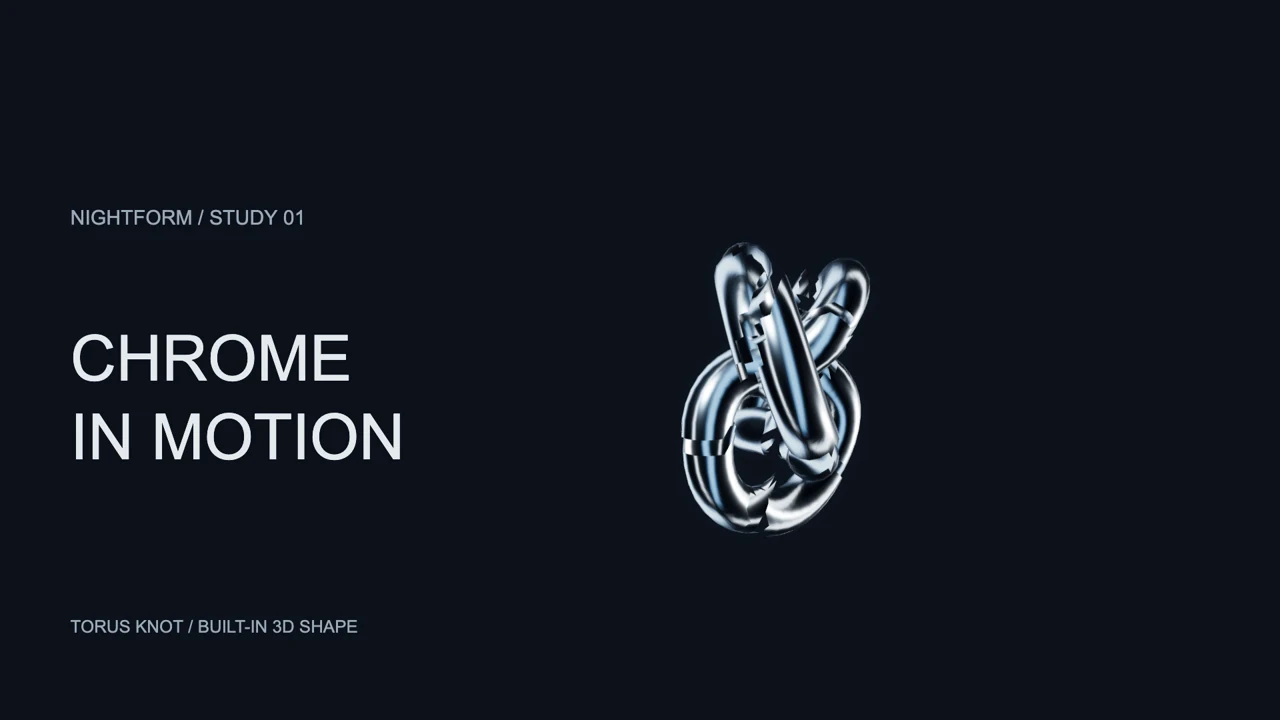
This silent animation shows a reflective 3D shape with a separate title area:
Actual VisualizerWave renderer and exporter: H.264 MP4, 1920 × 1080, 30 fps, six seconds, with no audio track. Reused from the 3D guide; this is not G-Force footage. Its motion uses illustrative response values, rather than demonstrating a particular song's analysis.
The example demonstrates a completed file and a deliberate composition. The moving sculpture has room beside the text, so the visual identity is part of the video rather than something added around a captured desktop. The 3D visualizer tutorial explains the shape, rotation and response controls.
For your own release:
- Import the finished track. Choose the intended landscape, square or vertical canvas before arranging the scene.
- Build the composition. Choose a visual, add your artwork or text, and check quiet and strong passages for readable placement.
- Export a short sample. In Export video, use Export 5-second test and check the downloaded result with your own soundtrack.
- Save the project. A portable
.visualizerwaveproject lets you return to the composition and replace the media for another release.
Run the compatibility check first. Available formats, resolution and render speed depend on the browser, device and scene. The short example does not establish full-song reliability or benchmark G-Force against VisualizerWave. Media processing and rendering happen on your computer; account and purchase services are separate.
Which workflow fits your next project?
Choose G-Force when your priority is reactive visuals while listening, and its current player or Standalone input works for your setup. Check the current vendor download and documentation rather than relying on a legacy mirror. If public display or recording is part of the plan, resolve the licensing and capture method first.
Choose VisualizerWave when your task starts with an owned recording and ends with a video file containing your visual, artwork and titles. Follow the music-video creation guide, then check a short export before rendering the whole track.
If you need to construct a broader live-performance scene, the Magic Music Visuals comparison covers another desktop workflow. “G-Force visualiser” can lead to a listening tool or a recording question; the right choice depends on which result you need.
See VisualizerWave's one-time offer.
G-Force and SoundSpectrum are names of their respective owner. VisualizerWave is not affiliated with SoundSpectrum.