An open source music visualizer can be a live application, a rendering library or a tool that saves a finished video. For a reproducible waveform or spectrum MP4, FFmpeg completed our local export tests. For MilkDrop-style visuals, projectM is a rendering library with separate applications and an offline conversion integration. Wav2Bar is a composition editor to evaluate carefully: its older app and ongoing rewrite have different licenses and different export readiness.
Choose the output you need before choosing the project. A responsive screen or a public repository does not establish that you can export a complete song with its soundtrack.
Checked October 25, 2026. VisualizerWave publishes this guide. We verified the projects’ current source documentation and licenses, and completed the FFmpeg exports shown below. We did not install or complete exports in projectM or Wav2Bar. The public examples contain no audio tracks.
Free access and open source answer different questions
A free website may let you download a video while keeping its code private. Open source concerns the software’s license, including permissions to use, modify and redistribute its code under the stated terms. A GitHub repository without an appropriate license is not enough evidence.
For an audio visualizer, check the exact repository and version. A core library, desktop frontend, preset collection and rewrite may have separate licenses. Also check whether the available download is a finished application, a development preview or source code that you must build.
This is why the following table separates the project from its export path:
| Project reviewed | License checked | Route to video | Verification here |
|---|---|---|---|
| FFmpeg | LGPL base; optional components change the build’s terms. Our installed build reports GPL v3 or later | Command-line audio filters and video encoding | Two silent MP4s and a separate internal soundtrack-mapping check completed |
| projectM core | LGPL 2.1 | Separate host application or integration; gst-projectm documents offline MP4 conversion | Core and integration documentation reviewed; no export test |
| Older Wav2Bar app | GPL-3.0-or-later | Object-based composition with a separately configured FFmpeg executable | Website, repository and license reviewed; no export test |
| Wav2Bar rewrite | MPL 2.0 | README still leaves FFmpeg integration and build instructions to be defined | Development candidate; no completed-export claim |
If your priority is simply choosing a video maker, the general audio visualizer comparison evaluates that broader workflow. This page focuses on source licenses, project identity and the path from audio to an actual file.
FFmpeg: a tested route to a waveform or spectrum video
FFmpeg can turn an audio stream into video with showwaves for sample waveforms or showfreqs for a frequency spectrum. It is useful when you want a repeatable command and are comfortable working in a terminal. A designed release with artwork and titles requires additional composition work.
We used FFmpeg 8.1 on macOS and the same existing eight-second stereo diagnostic recording for both examples. Its sections change frequency content and level, then end in silence. No new music was generated or uploaded to a service.
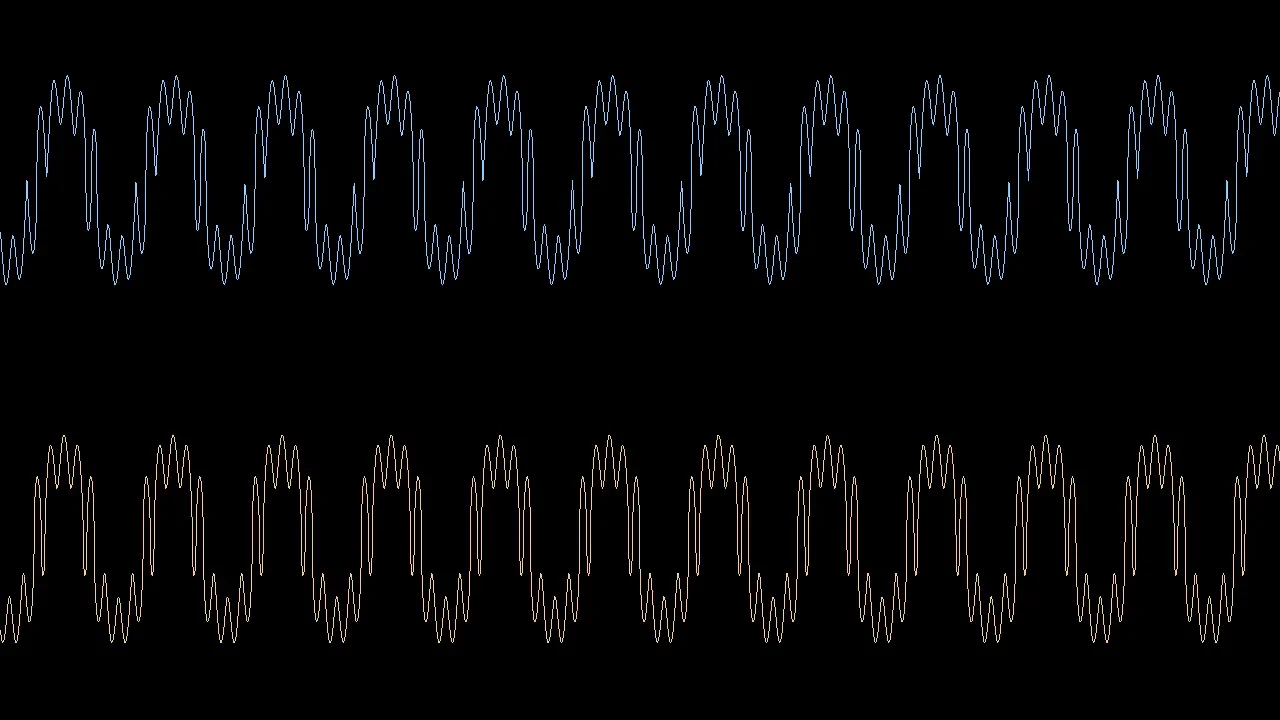
Sample waveform: two stereo channels
Actual FFmpeg output: 1280 × 720, 30 fps, eight seconds and 240 H.264 video frames. The blue and gold traces show the two channels separately. The file has no audio stream.
This is the command used, with input.wav standing in for your source file:
ffmpeg -i input.wav \
  -filter_complex "[0:a]showwaves=s=1280x720:mode=p2p:rate=30:split_channels=1:colors=0x8dceff|0xf7cf8c:scale=sqrt:draw=full,format=yuv420p[v]" \
  -map "[v]" -an -c:v libx264 -crf 18 -preset medium \
  -movflags +faststart waveform.mp4
The -an option deliberately makes a silent visual example. To include your own recording in a release, replace -an with:
-map 0:a:0 -c:a aac -b:a 192k
We checked that mapping in a separate internal file: it contained eight seconds of H.264 video and eight seconds of non-silent AAC audio. That file is not a public listening example. The command needs a build containing the selected filters and encoders; check your installation rather than assuming every FFmpeg package includes them.
Frequency spectrum: the same source, another representation
Actual FFmpeg output with the same dimensions, frame rate and eight-second duration, also without an audio stream. Here frequency runs across the image; the picture is not a waveform trace.
For this export, we replaced the waveform filter with:
showfreqs=s=1280x720:mode=bar:rate=30:ascale=log:fscale=log:win_size=2048:colors=0x8dceff|0xf7cf8c
The active frame at 1.2 seconds showed the lower-frequency component. At 3.1 seconds, another prominent region appeared after the source added a higher component. The frame at 6.8 seconds, during digital silence, settled to a thin line along the bottom. This demonstrates the tested filter response; it is not a calibrated measurement or a comparison of music genres.
Both public MP4s decoded successfully through their full length. These short checks establish working export commands on this machine, rather than long-track performance or support on every operating system. The waveform and spectrum guide explains the representations in more detail.
projectM: distinguish the library from the application
The current projectM repository explicitly contains libprojectM, the visualization library used by application developers. It renders MilkDrop-style presets with OpenGL. Downloading the core library release is therefore a different job from installing a ready-to-use visualizer.
The repository points users to separate frontends and warns that current development previews may have missing features or bugs. It also says the core library does not ship presets; frontend packages carry different collections. Check the selected application and preset package together.
There is a documented offline route: gst-projectm, a GStreamer integration hosted in the projectM organization. Its README describes audio-to-MP4 conversion through a projectm-convert wrapper with a Docker setup, plus manual pipelines. That is more relevant to a saved video than assuming a live frontend has an Export button.
We read that conversion documentation but did not build its container or run the pipeline. If you want projectM’s visual style, begin with a short conversion and verify the exact integration, presets, audio routing and output file before designing a full release around it. The existence of a current core-library commit does not verify every frontend or plugin.
For live PC listening, the Windows visualizer guide covers the separate input-selection task.
Wav2Bar: the older editor and rewrite are different targets
The older Wav2Bar website describes an editor built from visualizer objects, text, images, timers and particle flows. Its documented workflow is to configure the source and canvas, compose the objects, then export an MP4. The repository says FFmpeg must be installed separately and configured for export.
Its website lists 0.3.5 Beta packages for Windows, a Linux ZIP with limited support, and source-only Mac instructions marked without support. It describes development moving to wav2bar-reborn. Those are current distribution statements, not results from installing the app on each platform.
The licensing difference is concrete: the older project states GPL-3.0-or-later, while the rewrite states MPL 2.0. The rewrite’s README also says FFmpeg integration and creating builds are still to be defined, and that there is no CLI support for now.
Evaluate the older app’s documented export workflow separately from progress in the rewrite. We would not treat the rewrite as a verified replacement for that exporter based on its name or activity alone. Save a small project and produce a complete test file before investing time in a release layout.
A practical acceptance check for an open-source visualizer
Before committing a full track, establish these five things:
- Project identity: you know which app, library, plugin or rewrite you are using.
- License: the exact source version and relevant asset packages have stated terms that fit your use.
- Working output: a saved video opens in your intended player or editing application.
- Correct media: dimensions, frame rate, duration and soundtrack match the deliverable.
- Repeatability: the command, project and source media can be saved and reused.
An analysis application can be valuable without being a music-video editor. The Sonic Visualiser comparison explains that distinction. If MusicVid is already your starting point, its dedicated comparison covers that named workflow; free access alone is not the source-license test used here.
If you prefer a finished browser editor
VisualizerWave is a separate paid alternative to the open-source projects reviewed above. It provides editable artwork, title and reactive layers, local media analysis and rendering, and portable .visualizerwave projects for $19 once, with unlimited exports.
That can fit an artist who wants to build a release composition without maintaining a command or integration. Account and checkout services still use the network, and export formats and resolutions depend on the browser and device. Use the compatibility check and the music visualizer creation guide to evaluate that workflow.